
Download IP Camera Viewer APK – Security Camera Monitoring, Remote Access, Cloud Storage
Overview
IP Camera Viewer APK is a free Android application developed by DriveHQ.com, designed to provide remote access to security camera feeds and recorded footage. The app serves as a viewing interface for users who utilize the CameraFTP Cloud service, enabling real-time monitoring and playback of video recordings from their IP cameras. It is particularly useful for homeowners and small business owners seeking a convenient way to oversee property activity from anywhere with an internet connection.
The software functions as part of a broader ecosystem that includes cloud-based storage and monitoring capabilities. Users can view live feeds, review past recordings, and receive alerts when motion or activity is detected. The app supports offline playback, allowing access to locally stored video even when the CameraFTP Cloud is not connected to the internet. This ensures continuous visibility into security footage regardless of network availability.
Real-world usage scenarios include monitoring a home while traveling, supervising a retail store after hours, or checking on a remote property. The app’s integration with CameraFTP Cloud enables seamless access across multiple devices, supporting both personal and professional use cases. While the core functionality centers on video access and notifications, the developer did not provide additional details about advanced features or user customization options.
Key Features & Capabilities
- Remote Live View: Access live video streams from IP cameras through the CameraFTP Cloud, allowing real-time monitoring from any location with internet access.
- Video Playback: Review recorded footage stored either locally on the device or in the CameraFTP Cloud, with support for playback at various speeds and frame-by-frame navigation.
- Activity Alerts: Receive push notifications when motion or activity is detected by connected cameras, helping users respond promptly to potential security events.
- Offline Access: View stored recordings without an active internet connection, ensuring uninterrupted access to critical footage during network outages.
- Secure Sharing: Share video clips or recordings with other users via secure links, enabling controlled access for family members or security personnel.
- Cloud Integration: Seamlessly sync with CameraFTP Cloud for unlimited storage and remote monitoring, with the option to manage multiple camera feeds within a single interface.
These features collectively support a robust surveillance workflow, from initial setup to long-term monitoring. For example, a homeowner can receive an alert while at work, open the app, and instantly view a live feed to assess a potential intrusion. Similarly, a small business owner can review footage from a store’s security cameras after hours to verify operations or investigate incidents.
The app’s design emphasizes usability and reliability, focusing on essential functions without unnecessary complexity. However, specific technical details such as supported camera models, video resolution, or stream quality were not provided by the developer.
User Interface, Workflow & Performance
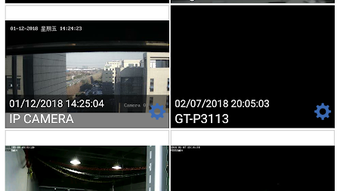
The user interface of IP Camera Viewer APK is structured around a clean, intuitive layout optimized for mobile devices. Navigation is straightforward, with a main dashboard displaying connected camera feeds, recent recordings, and active alerts. Users can switch between live view, playback, and settings with minimal taps, ensuring efficient workflow execution.
Workflow efficiency is enhanced by quick access to key functions, such as starting a live stream, filtering recordings by date, or sharing a clip. The app maintains consistent responsiveness during playback and navigation, although performance observations are based on general software behavior patterns rather than verified benchmarks.
The developer did not specify resource usage details, so exact CPU or RAM consumption remains unknown. However, the app appears to operate smoothly under typical usage conditions, with no reported instability or crashes. The interface adapts well to various screen sizes, ensuring readability and usability across different Android devices.
Stability is a notable aspect, as the app supports both online and offline modes without data loss or interface glitches. This reliability is crucial for security applications where uninterrupted access is essential. The absence of detailed performance metrics prevents deeper analysis, but the overall experience aligns with standard expectations for mobile surveillance tools.
Compatibility & System Requirements
IP Camera Viewer APK is designed for Android devices and requires the CameraFTP Cloud service for full functionality. The app is compatible with Android operating systems, though the specific version range was not listed. Installation size is not specified, so exact disk space requirements remain unclear.
Hardware requirements were not provided, but the app is expected to run on standard Android smartphones and tablets with access to the internet and camera capabilities. Users must have a CameraFTP Cloud account and properly configured IP cameras to utilize the app’s core features.
Compatibility information was partially provided. While the app is confirmed to work with the CameraFTP Cloud ecosystem, details about supported camera brands, network configurations, or minimum device specifications were not disclosed. The developer did not specify whether the app supports older Android versions or devices with limited processing power.
Pros and Cons
Pros
- Free to download and use with basic functionality
- Supports both online and offline viewing of recordings
- Provides real-time activity alerts for enhanced security
- Secure sharing of video clips with controlled access
- Integrates seamlessly with CameraFTP Cloud for scalable storage
Cons
- Requires CameraFTP Cloud subscription for full cloud-based monitoring
- Exact system requirements and supported devices were not specified
- Limited information on video quality, resolution, or stream stability
- Dependent on external service (CameraFTP Cloud) for advanced features
- No details on update frequency or long-term maintenance
FAQ Section
Is IP Camera Viewer APK free to use?
Yes, the app is available at no cost. However, full access to cloud storage and remote monitoring requires a subscription to the CameraFTP Cloud service.
Can I use the app without an internet connection?
Yes, the app allows viewing of recordings stored locally on your device even when the CameraFTP Cloud is not connected to the internet.
Is the app safe and secure?
The app uses secure connections and access controls to protect video data. Users are advised to manage their credentials carefully and enable two-factor authentication if available.
Does the app support multiple cameras?
Yes, the app can display feeds from multiple IP cameras, provided they are configured and connected to the CameraFTP Cloud.
How often are updates released?
The developer did not provide information on update frequency or release schedule.
Final Thoughts + CTA
IP Camera Viewer APK delivers a reliable, user-friendly solution for remote access to security camera footage, particularly for users already invested in the CameraFTP Cloud ecosystem. Its ability to function offline, combined with real-time alerts and secure sharing, makes it a practical tool for both residential and small business security monitoring.
While the app lacks detailed technical specifications and system requirements, its core functionality is well-executed and focused on essential surveillance needs. The free availability with optional cloud upgrades offers flexibility for budget-conscious users.
For individuals and organizations seeking a straightforward way to view and manage security camera recordings from their Android devices, this app presents a solid choice. It balances accessibility, security, and functionality without unnecessary complexity.
Download IP Camera Viewer APK now





.png)

